Screening that sees the whole transaction – not just the name.
TFI TradeScreen (formerly TFI Sentinel) is the screening workspace in TFI TradeCore. It checks parties, beneficial owners, officers, vessels, goods and transport routes in the context of a transaction, shows every hit with evidence – and material hits hold release and payout until a four-eyes decision is made.
Pre-production – part of TFI TradeCore
- listVessel IMO 9112233 – listed · held
- uboNo sanctioned holding ≥ 50%
- networkShared account with counterparty · review
- shellNo ICIJ hits, LEI active
- exportHS 8479 · not controlled
- routeTransit via transshipment hub · review
- tbmlUnit price above reference band · review
TradeScreen in under a minute
The case overview, signals and sanctions matches, the screening rosette and a decision recorded with its reason.
Eight check areas, one picture
TradeScreen combines every screening result of a case into one situation – “hold”, “review”, “clear” or “not run” – derived from the same verdicts the release gate uses.
Sanctions
Beneficiary, applicant, every counterparty, beneficial owners, officers and vessels against the installed lists – explainable matching with similarity score, reason and list version.
Ownership and control
Sanctioned holdings are aggregated (50% rule); a control limb escalates even below the threshold.
Party network
Shared addresses, registrations, accounts and vessels, role reversal, circular trade, double financing and duplicate documents within your own book – with clusters and layering paths.
Shell companies and offshore
Seat in a secrecy jurisdiction, hits in the ICIJ Offshore Leaks, lapsed or missing LEI, nominee structures, GLEIF parent chains – condensed into a weighted signal.
Export control and dual use
HS code, catch-all terms, embargoed and high-risk destinations, licence, end use and end user; goods without an HS code are held.
Vessels and the shadow fleet
Vessel on a list, high-risk ports and flags, transshipment, ownership chain and shadow-fleet tanker patterns; sea freight without a named vessel is held.
High-risk corridors
The route by UN/LOCODE and the bank chain by BIC country: transit via diversion hubs, free trade zones, loops and contradictions with the destination.
TBML and prices
15 versioned typologies – over- and under-invoicing, third-party payers, threshold structuring, transport capacity, vague goods descriptions and more.
When TradeScreen holds
- 01
Legal prohibitions always hold
Confirmed sanctions hits, embargoes and export control prohibitions hold release and payout – no exceptions via thresholds.
- 02
Signals hold when material
Shell-company and corridor signals hold above a threshold your institution sets; below it they appear as advice.
- 03
People decide
Hits are decided under the four-eyes principle: whoever worked the case cannot clear its screening.
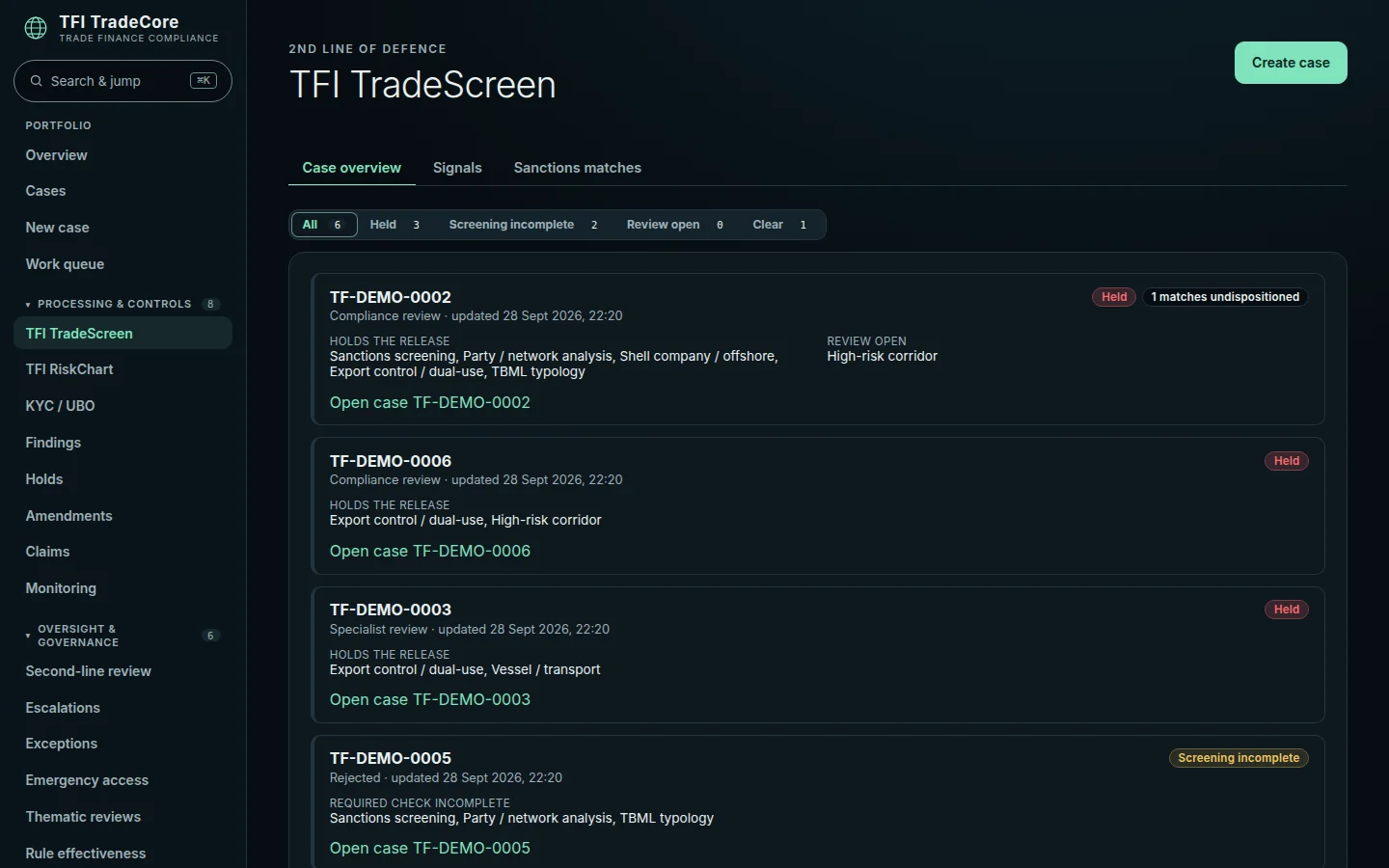
The workspace
- 01
Situation board
Every running case with its screening situation, held cases first, filterable by check area.
- 02
Signal queue
Open screening findings across the portfolio – including expired risk acceptances that hold again.
- 03
Match queue
Sanctions hits awaiting a decision, with evidence and through the same maker-checker path as in the case.
- 04
Register search
A searchable sanctions and vessel register – built from the same data the screening runs against.
Official sources, in your environment
TradeScreen does not need a list-data licence from us. It ships with adapters for official sources; the data is fetched and versioned in your environment, so every check shows which version it ran against.
- Nine official sanctions and debarment lists: EU, UN, OFAC SDN, United Kingdom, US Consolidated Screening List (incl. BIS), SECO, DFAT, Japan and the World Bank
- ICIJ Offshore Leaks, GLEIF (LEI and parent chains) and UN/LOCODE for offshore, ownership and route checks
- Daily refresh, never with an empty list; cases cleared against an older list are flagged
- Your own or licensed data via a normalised import format; ready-made adapters for commercial vendors are not yet included
What TradeScreen does today – and what is next
What is implemented and tested in the code is called implemented. What is planned is called planned. TradeCore is not yet approved for production use.
| Feature | Status |
|---|---|
| Eight check areas with evidence per hit, situation board and queues | Implemented, tested |
| Holding release and payout on material hits | Implemented, tested |
| Adapters for nine official lists, ICIJ, GLEIF and UN/LOCODE | Implemented – fetched in your environment |
| Threshold calibration of name matching on your lists | Implemented |
| Automatic start of all checks on submission | Planned |
| PEP screening: interface and placeholder implemented – the service is customer-provided | Interface ready – not live |
| Adverse media feeds (today: captured by analysts) | Planned |
| Adapters for commercial list vendors, live AIS | Planned |
Frequently asked questions
What happened to TFI Sentinel?
TFI Sentinel is now called TFI TradeScreen and is the screening workspace in TFI TradeCore.
Does TradeScreen decide automatically?
No. TradeScreen holds when a material hit is open – decisions are made under the four-eyes principle. The logic is deterministic and explainable; there is no AI in the decision path.
Which lists does TradeScreen use?
Official lists straight from the source – EU, UN, OFAC, UK, the US Consolidated Screening List, SECO, DFAT, Japan and the World Bank – plus ICIJ, GLEIF and UN/LOCODE. The data is fetched in your environment; your own or licensed data connects through a normalised format.
Can I use TradeScreen without TradeCore?
TradeScreen is part of TradeCore because its hits steer release and payout of a transaction. You can start with TradeScreen as your first workspace and adopt the other areas step by step.
See TradeScreen on your cases?
We show TradeScreen in TradeCore on anonymised examples and discuss what a pilot project in your environment looks like.
or write to info@tradefinance-intelligence.com